
HOTCOIN Logo
Buy Crypto
Market
Trade
Futures
Earn
Rewards Hub
More
Web3 Wallet
Service Contacts

[email protected]

Product Feedback

[email protected]

Business Cooperation

[email protected]

Legal Contacts

[email protected]

Contact us
Service Contacts

[email protected]

Product Feedback

[email protected]

Business Cooperation

[email protected]

Legal Contacts

[email protected]

About us
Platform Introduction
Announcement Center
System Status
User Agreement
Privacy Policy
Legal Description
Products
Futures
Spot
Copy Trading
Margin
Earn
Trade Crypto via P2P
Buy Crypto with Card
Web3 Wallet
Service
Live Streaming
Hotcoin Elite Picks
Rewards Center
Friend Referral
VIP Benefits
Download
P2P Merchant Application
Support
Hotcoin Academy
Help Center
API Docs
Fee Rate
Crypto Info
Listing Application
Online Service
User Feedback
Official Verification
Trading
BTC USDC
ETH USDC
BTC USDT
ETH USDT
PI USDT
SOL USDT
XRP USDT
©2017-2026
Help Center
/P2P/P2P Trading Guide/
How to Buy Crypto via Hotcoin P2P on the App
Help Center
/P2P/P2P Trading Guide/
How to Buy Crypto via Hotcoin P2P on the App

How to Buy Crypto via Hotcoin P2P on the App

Hotcoin
Share


What Is P2P Trading?


P2P (Peer-to-Peer) trading allows users to buy and sell cryptocurrencies directly with one another, without intermediaries. Unlike traditional exchange-matching models, P2P trading gives users the flexibility to choose trading partners, negotiate prices, and select preferred payment methods independently. Hotcoin P2P supports trading cryptocurrencies using fiat currencies such as CNY, THB, and other local options. The platform integrates escrow protection, order-matching tools, and a dispute resolution system to ensure secure, transparent, and fair transactions.


How to Buy Crypto via P2P on the App


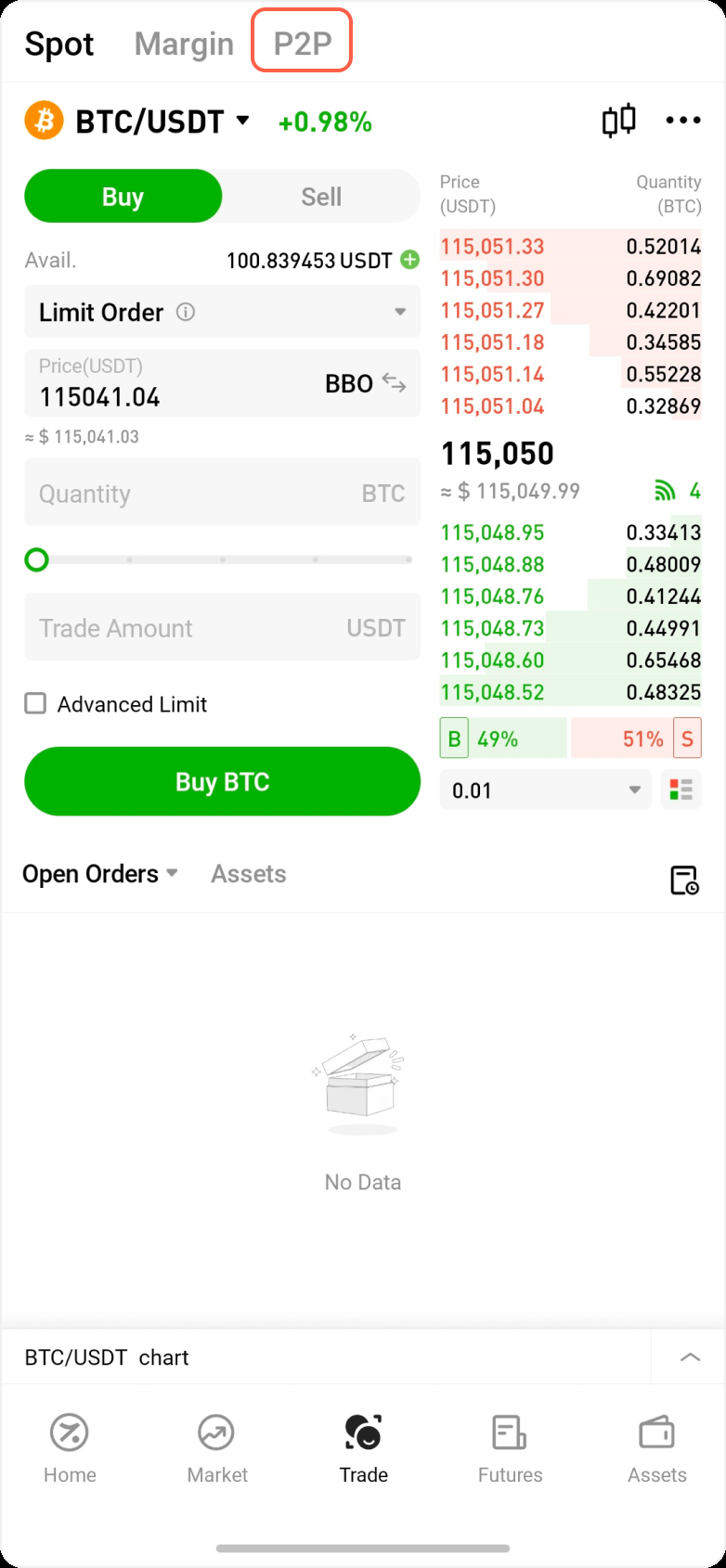
1. Enter the P2P Page


Open the Hotcoin App, tap the Trade icon at the bottom of the screen, then tap the P2P tab at the top to enter the Buy page.


2. Select a Merchant


On the Buy page, USDT is the default cryptocurrency for purchase. To change your fiat currency (e.g., CNY), tap the currency label in the upper-right corner.
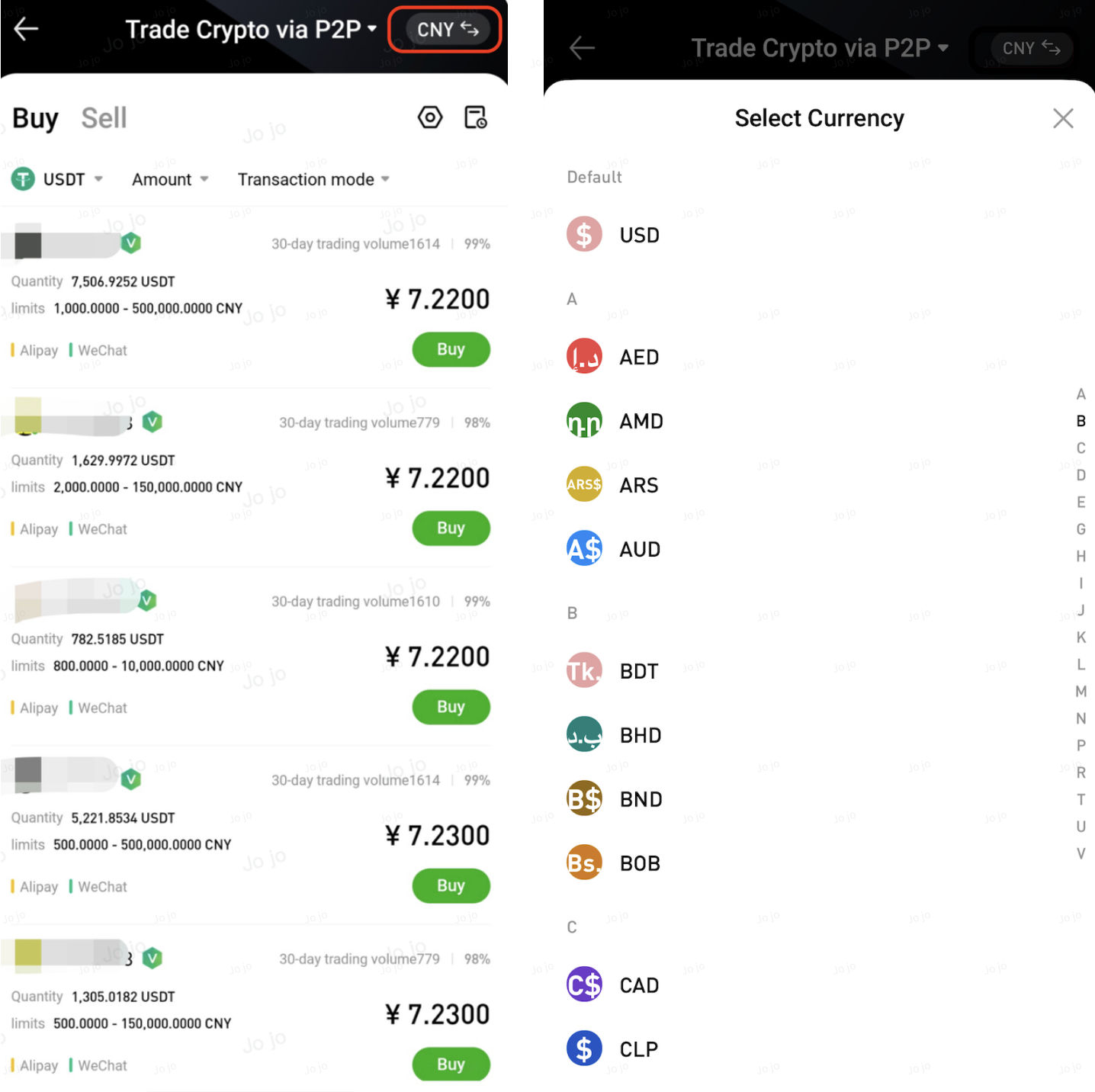


Each merchant listing displays:

  • USDT price
  • Available quantity
  • Order limit per transaction
  • Supported payment methods

When choosing a merchant, consider the following:
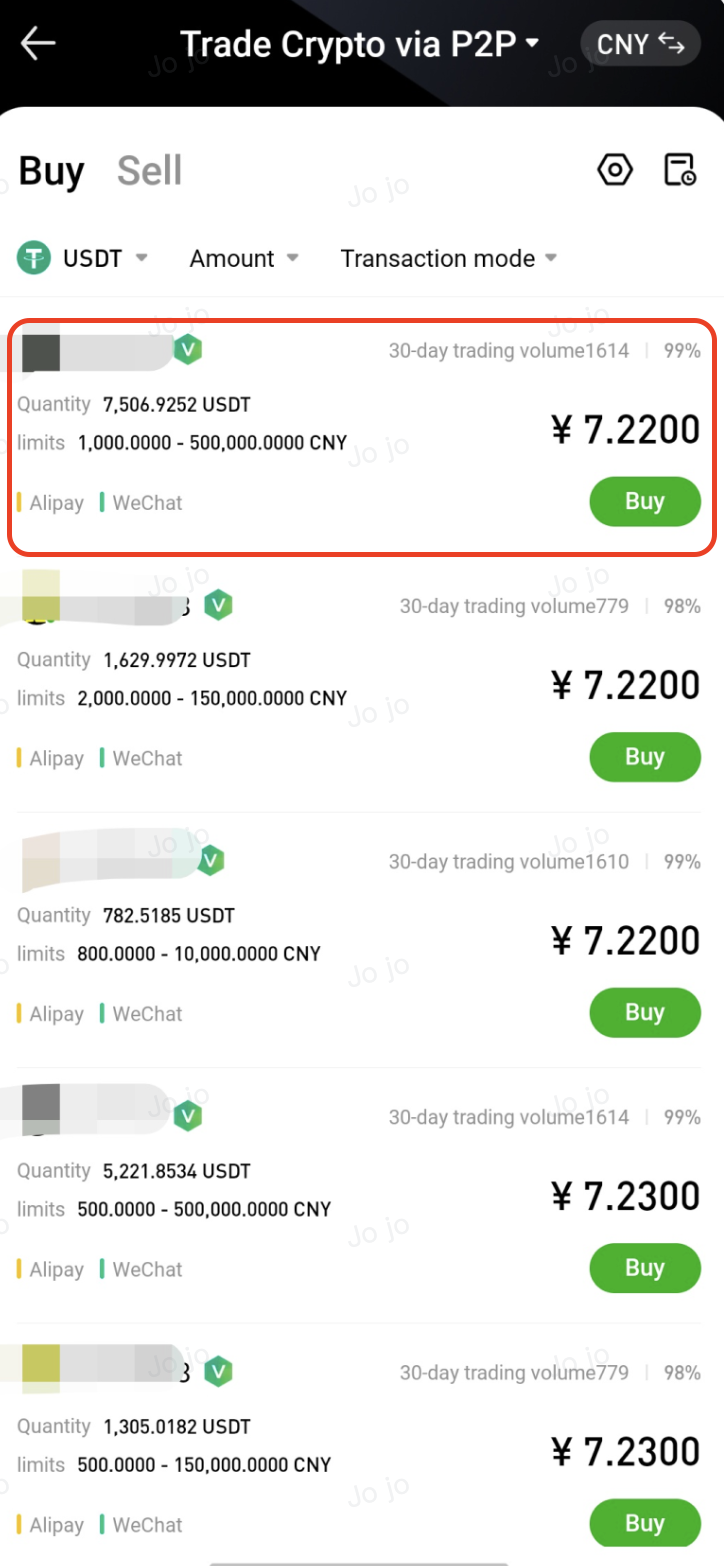
  • Price: Choose a merchant with a price that meets your expectations
  • Limit: Ensure your purchase amount falls within the merchant’s order limits
  • Completion rate: Prefer merchants with a completion rate above 95% for higher reliability
  • Payment methods: Make sure the merchant supports your preferred payment method


3. Create an Order


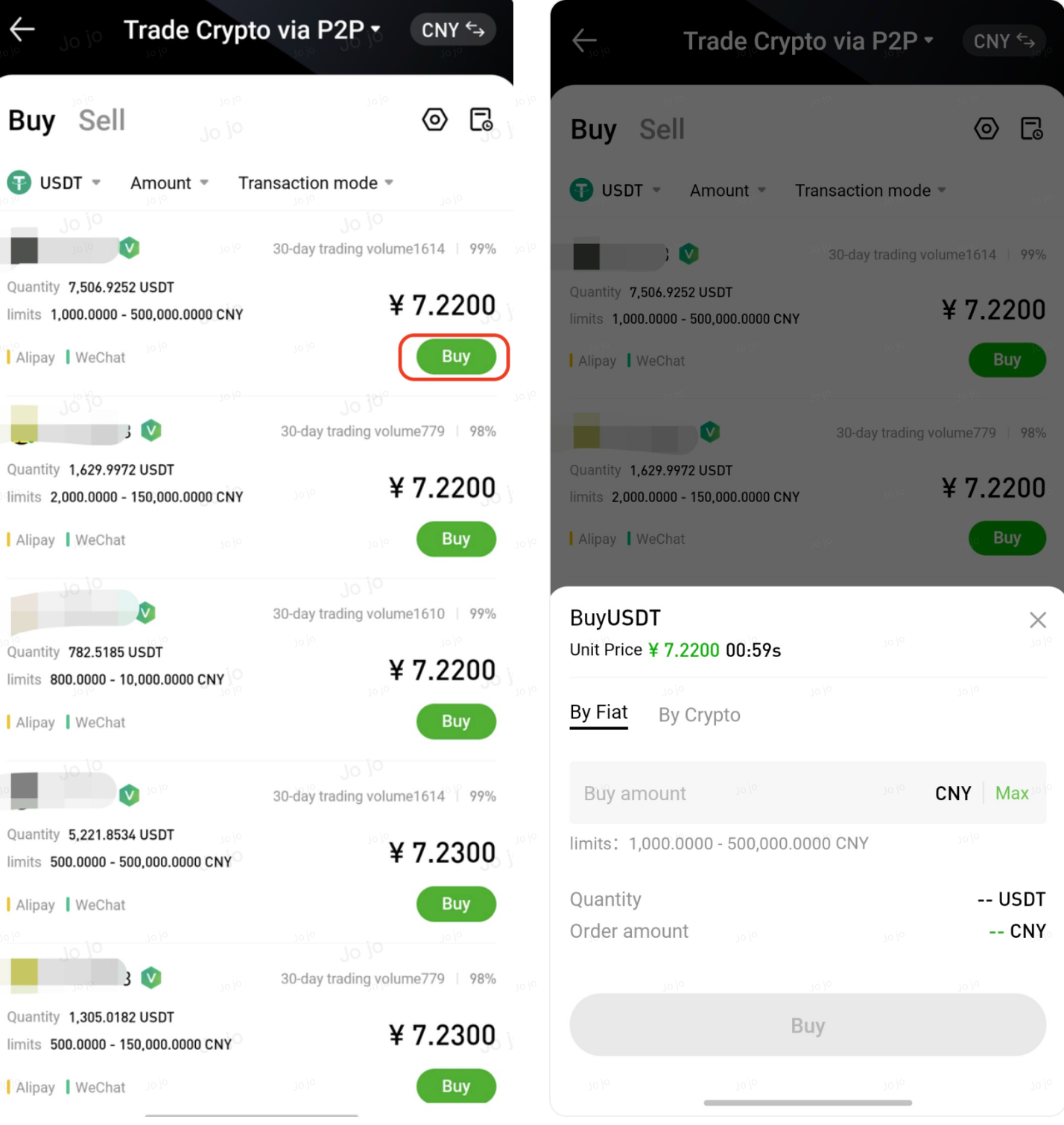
  • Click the green Buy button next to a merchant to enter the order page
  • Enter the fiat amount in By Amount, or enter the USDT quantity in By Quantity
  • After confirming the details, click Buy to create the order and enter the payment page


Important: After the order is created, the price will be locked. Payment must be completed within 15 minutes, or the order will be automatically cancelled.


4. Confirm the Order


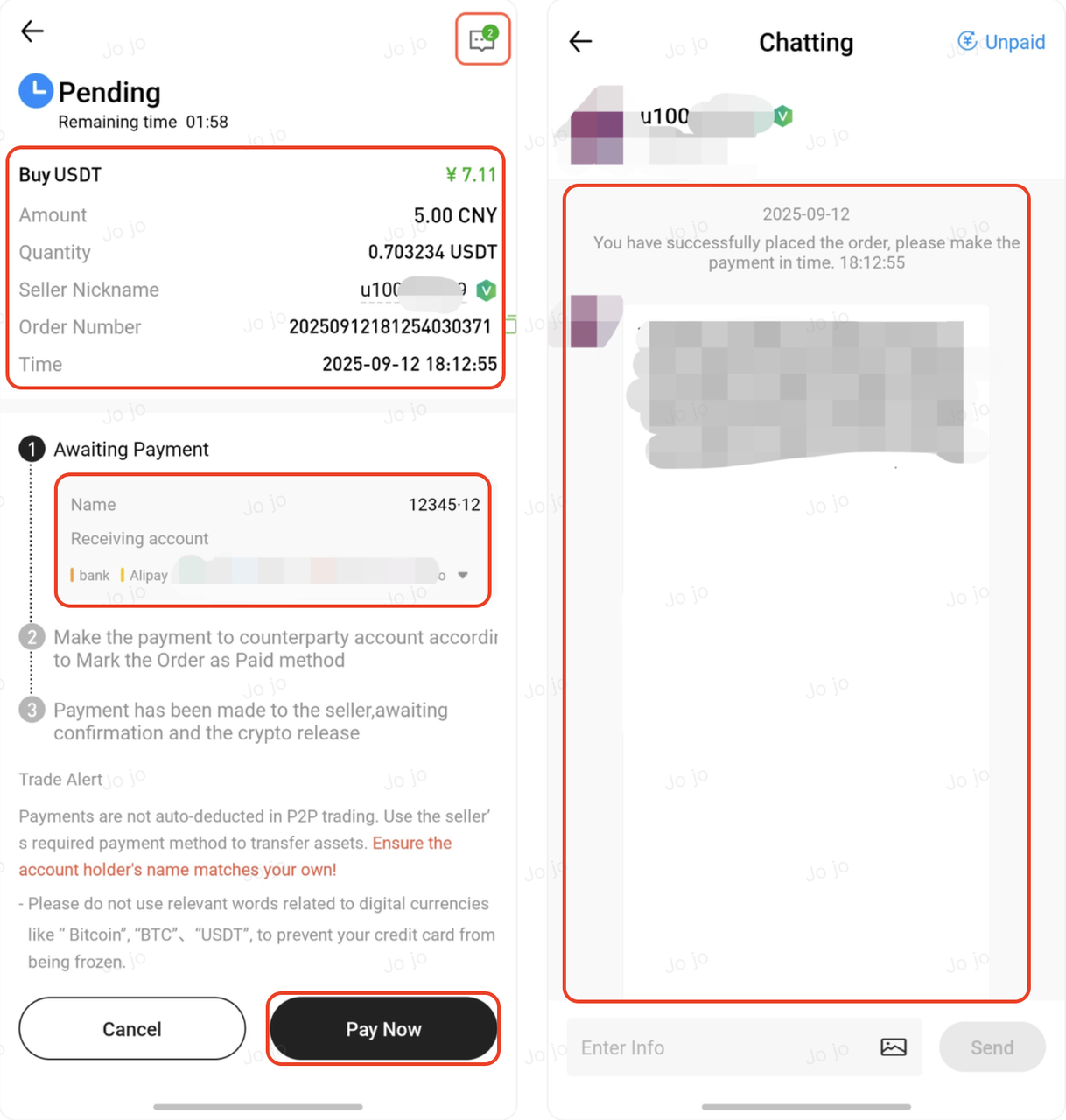
On the Pending Payment page:

  • Confirm the order details
  • Check the merchant’s payment account information
  • Review the merchant’s chat messages for any trading instructions

After confirming everything is correct, click Pay. If you need to cancel the order, click Cancel.


⚠️ Do not cancel the order if you have already transferred the funds.


5. Complete the Transfer and Confirm Payment


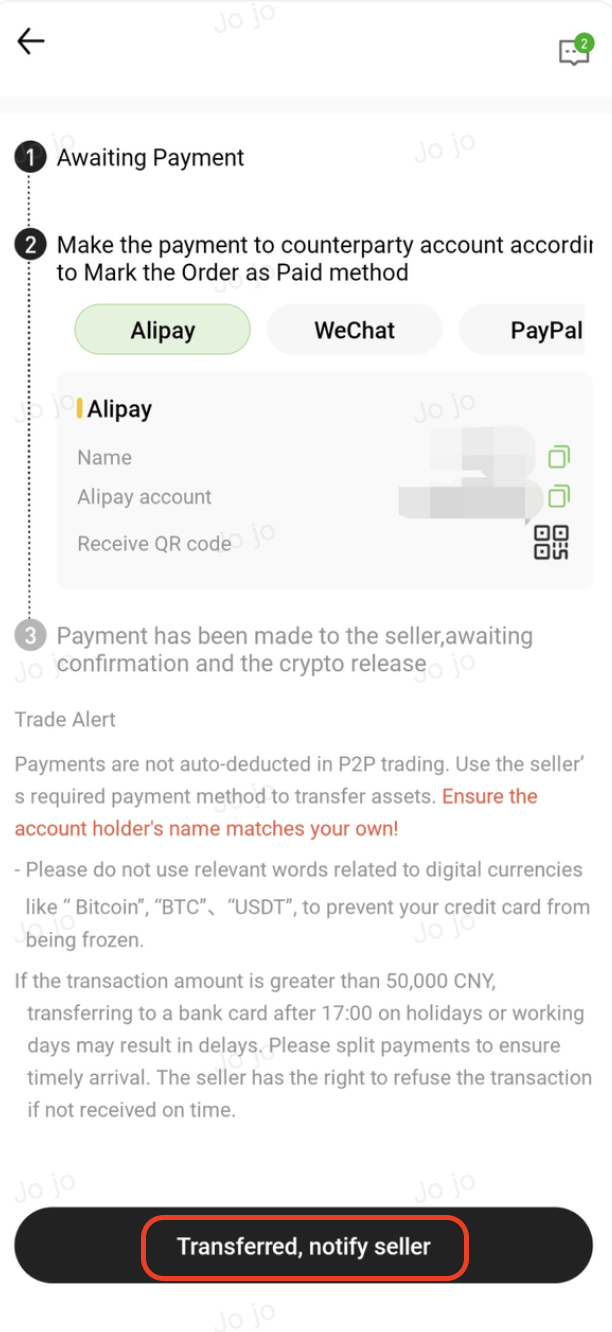
Transfer the payment to the merchant using the specified method (e.g., WeChat Pay, Alipay, or bank transfer). Once the transfer is complete, tap I Have Paid.


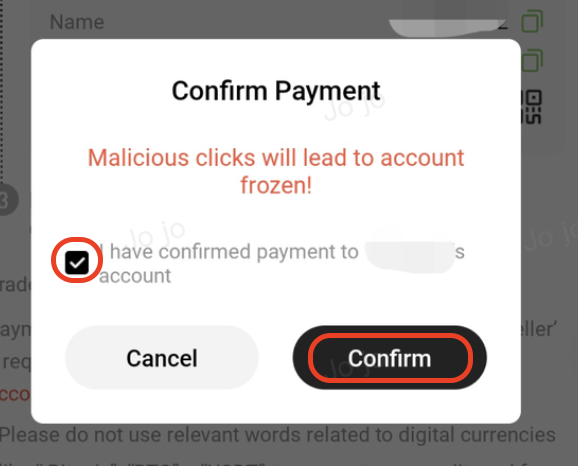
In the confirmation pop-up, check I confirm that I have transferred the funds to the merchant's account, then tap Confirm.


⚠️ Notes

  • Please complete the transfer within the remaining payment time
  • If multiple payment methods are supported, choose one method before making the payment
  • Use a payment account verified under your own name
  • Do not include any cryptocurrency-related remarks in the transfer note (e.g., BTC, USDT)


6. Waiting for Crypto Release


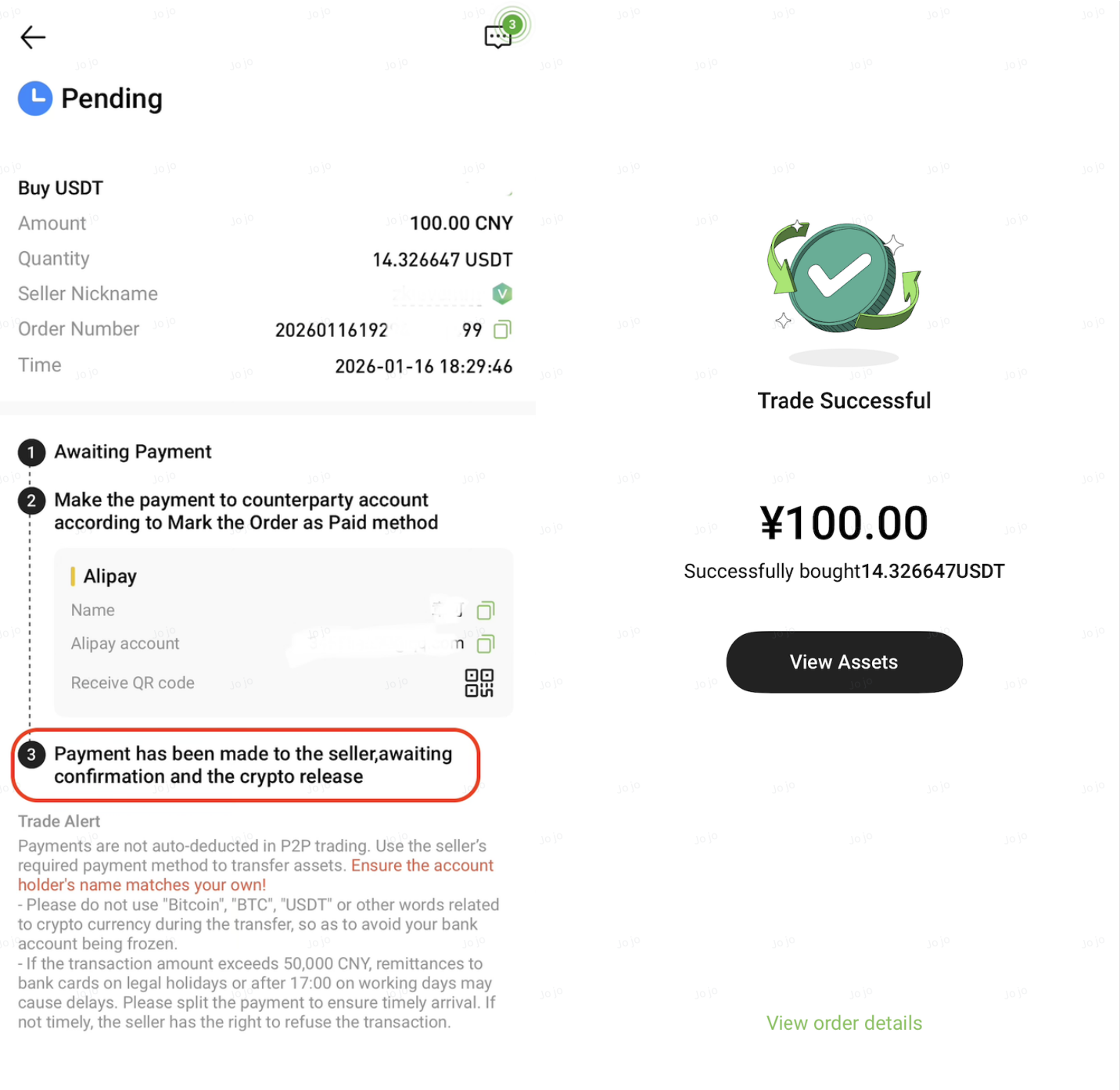
After payment confirmation, the order status will change to Pending Release, indicating that the merchant is verifying your payment before releasing the crypto. This process usually takes 5–30 minutes, depending on the merchant’s online status.

Once the merchant confirms the payment and releases the cryptocurrency, the order status will update to Completed, and the digital assets will be credited to your account.


Important Notice


  • 24-Hour Withdrawal Limit: A 24-hour withdrawal restriction will be triggered on your account after purchasing crypto via fiat.
  • Scope of Restriction: This applies to all assets in your account. During this time, on-chain withdrawals and P2P selling will be disabled.
  • Available Services: The 24-hour countdown starts from your latest fiat purchase. You may still use your assets for Spot, Futures, and Earn trading within the platform.


Related Articles


P2P Trading FAQs

P2P Orders and Account Assets

P2P Trading Safety and Dispute Handling

How to Buy Crypto via Hotcoin P2P on the Web

How to Sell Crypto via Hotcoin P2P on the App

How to Sell Crypto via Hotcoin P2P on the Web

Quick Start Guide
Cryptocurrency Basics
Beginner’s Guide
App Guide
Start Trading
VIP Program
Rewards Center
Account Security & KYC
Asset Security
Security Settings
KYC Verification
Deposit & Withdrawal
Deposit
Withdrawal
P2P
P2P Trading Guide
P2P Merchant Management
P2P Rules & Agreements
Friend Referral
Spot Trading
Spot Trading
Pre-market trading
Derivatives
Advanced Trading
Grid Trading
Trend Trading
Fundamentals of Technical Analysis (Candlesticks / MACD / RSI)
Prediction Market
Futures Grid
Futures Trading
Getting Started
Contract Type
Trading Mechanics
Risk Management
FAQ
Copy Trading
Getting Started
Follower Guide
Lead Trader Guide
Terms of Service
Web3 Wallet
Getting Started
Swap
Hotcoin Card
Hotcoin Earn
Alpha
Startup
Platform Support
Agreements & Rules